Home and Garden Buyer’s Guide — Browse the Available Products
Whether you are furnishing a room, organizing a busy space, updating your kitchen, or planning an outdoor project, knowing where to start makes browsing easier. Begin with the area you want to improve, then explore the product types that serve that purpose.
This guide introduces the Home and Garden shopping groups available through ShopZang and explains what to look for as you browse. Use it to move from a broad idea—such as “improve the patio”—to a manageable shortlist of products worth investigating.
Product selection, category labels, prices, and availability can change. Visit the current category directory and confirm the details of any item with the retailer before purchasing.
1. Where to Start Browsing
Open the ShopZang category directory and scroll to Home and Garden. Choose the section closest to the item you need rather than trying to review the entire selection at once.
If you do not have a specific item in mind, start with one of these questions:
- Which room or outdoor area do I want to improve?
- Am I replacing something, adding storage, or starting a new project?
- Do I need one product or several related pieces?
- What is my approximate budget?
- What measurements or existing equipment will affect the options?
Keep a short note of your answers. It will help you stay focused when you encounter appealing products that are unrelated to your original goal.
2. Home and Garden Category Overview
The groups below organize the Home and Garden sections into practical browsing paths. They are not product rankings or confirmation that every item is currently available.
| Shopping Group | Products to Look For | Useful Starting Question |
|---|---|---|
| Indoor Furniture | Desks, dining chairs, benches, console tables, end tables, nightstands, and TV stands. | What needs to fit in the room, and how will I use it? |
| Storage and Organization | Armoires, wardrobes, file cabinets, storage cabinets, coat racks, and storage ottomans. | What will I store, and how often will I need access? |
| Kitchen and Household Appliances | Cookware, bakeware, countertop ovens, deep fryers, water dispensers, and washing machines. | What task or capacity do I need? |
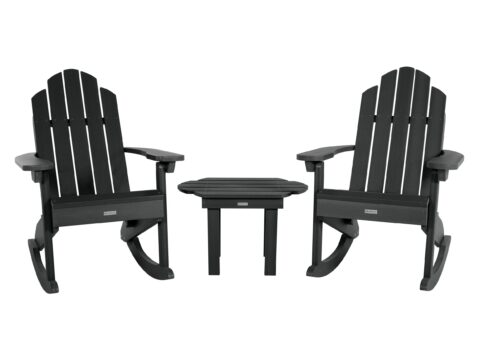
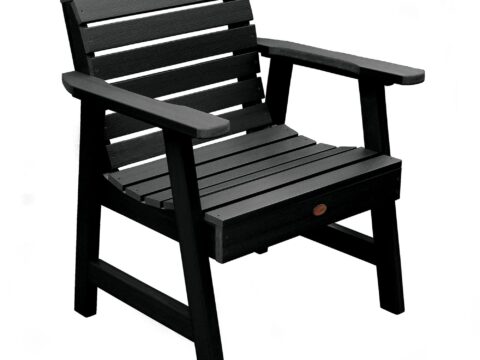
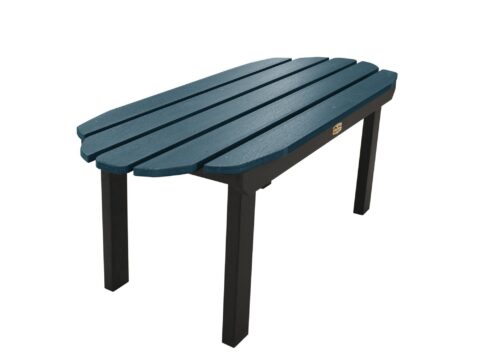
| Outdoor Furniture and Shade | Outdoor chairs, tables, benches, furniture sets, porch swings, umbrellas, and sunshades. | How do I want to use the outdoor space? |
| Gardening | Gardening tools, pots, and planters. | What am I growing or maintaining, and where? |
| Outdoor Structures | Sheds, garages, and carports. | What needs protection or storage, and what site is available? |
| Heating and Cooling | Fireplaces, patio heaters, HVAC controls, and air conditioner accessories. | Do I need a complete product or an accessory for an existing system? |
| Pool and Spa | Spas, pool and spa products, pool sweeps, and vacuums. | Am I planning a new installation or maintaining an existing one? |
3. Browse Indoor Furniture by Room and Function
For indoor furniture, choose the room first and the product type second. This keeps the search connected to how the furniture will be used.
Living Areas
Explore tables, benches, TV stands, and other relevant pieces. Before saving an item, note its overall dimensions and the function it will serve. Decide whether you need a surface, seating, equipment storage, or a combination.
Dining Spaces
When browsing dining chairs or related furniture, consider the pieces you already own. Record seat height, overall width, and other available measurements so you can compare them with your table and room.
Bedrooms
Look at nightstands, wardrobes, and other storage furniture with your daily routine in mind. Consider the height of nearby furniture, access to drawers and doors, and the items you want within reach.
Workspaces
Browse desks according to the work surface and equipment you need. A compact writing area and a workstation for multiple devices call for different comparisons.
For any furniture listing, verify whether the photos show one item, a set, or accessories that are sold separately.
4. Browse Storage Around What You Need to Put Away
Storage shopping becomes more useful when you start with the contents rather than the cabinet’s appearance.
- For clothing, explore wardrobes and armoires.
- For paperwork, investigate file cabinets and confirm the supported document format.
- For household items, compare storage cabinets and internal shelf dimensions.
- For entryways, consider coat racks or storage pieces that fit the available area.
- For multipurpose rooms, investigate storage ottomans and check their intended uses.
As you browse, record internal measurements when available. External dimensions alone do not tell you whether a shelf, drawer, or compartment can hold what you need.
Save any installation and anchoring requirements alongside the listing so they are not overlooked later.
5. Browse Kitchen Products by Task
Organize kitchen browsing around what you prepare and how you work, not simply the number of functions advertised.
Cookware and Bakeware
Start with the pan, dish, or baking format you need. Compare dimensions, capacity, materials, and the manufacturer’s compatibility and care information.
If you are browsing a set, list the pieces you expect to use. A larger set may not suit your needs if much of it duplicates equipment you already own.
Countertop Cooking Appliances
For countertop ovens, fryers, and similar products, record the external size and usable capacity. Save the instructions or specifications covering placement, clearances, power requirements, and cleaning.
Water Dispensers and Larger Appliances
Determine whether you need a freestanding unit, a countertop model, or a product with particular connections. For larger appliances such as washing machines, include access, installation, and utility requirements in your browsing notes.
Do not assume an appliance can be installed in your preferred location until you have checked the exact requirements.
6. Browse Outdoor Furniture by Activity
Think about what you want to do outside: dine, relax, entertain, or create a quiet seating area. Choose the activity before comparing furniture styles.
Outdoor Dining
Explore tables, chairs, and furniture sets. Compare the complete arrangement rather than the table alone, including room to move chairs and walk through the space.
Relaxing and Occasional Seating
Look at benches, chairs, and porch swings according to how many people will use them and where they will be placed. Check whether cushions, supports, or mounting hardware are included.
Umbrellas and Sunshades
Browse by the area you want to cover, then check the mounting or base requirements. Save the full product dimensions and any separate support components needed.
Maintenance and Storage
For each outdoor item you shortlist, read the manufacturer’s exposure, cleaning, and storage instructions. Decide where it will go when it needs protection or when the space is not in use.
7. Browse Gardening Tools, Pots, and Planters
Start with the gardening task or planting location. A few well-matched items are a more useful browsing goal than an assortment without a clear purpose.
Tools for Specific Tasks
Choose the task you need to perform, then compare the relevant tools. Note weight, dimensions, grip, reach, and maintenance information where provided.
If an item is powered, record whether the price includes the required battery, charger, or other accessories. Confirm compatibility rather than relying only on the brand name.
Pots and Planters
Browse containers according to the plant, location, and available space. Compare internal size, drainage arrangements, material, and the practicalities of moving or supporting the filled container.
Check the product’s intended use before choosing a decorative container for planting. If information is missing, ask the retailer rather than assuming it will suit the project.
8. Browse Sheds, Garages, and Carports as Projects
Outdoor structures deserve a project checklist before they become a shopping shortlist.
- What will the structure store or protect?
- What internal dimensions and entry opening are required?
- What site is available?
- What foundation or ground preparation does the manufacturer require?
- What anchoring and assembly work is involved?
- What local permissions or property restrictions need checking?
- How will the packaged structure be delivered and unloaded?
When comparing listings, distinguish the structure itself from optional flooring, installation, and accessories. Ask a qualified professional about uncertain site or structural requirements before buying.
9. Browse Heating and Cooling Products by Intended Use
Begin by separating complete products from accessories and replacement controls. This avoids comparing items that serve very different purposes.
HVAC Controls and Air Conditioner Accessories
Record your existing equipment’s exact model and specifications before browsing. Check the product’s compatibility information and ask the manufacturer or a qualified technician if the match is unclear.
Fireplaces and Patio Heaters
Read the intended location, installation requirements, fuel or power needs, and operating instructions before adding an item to your shortlist.
Do not assume indoor and outdoor heating products are interchangeable. Use each product only as directed and obtain professional installation where required.
10. Browse Pool and Spa Products by System
If you already own a pool or spa, begin with its specifications and maintenance needs. For cleaners, sweeps, vacuums, and accessories, compare the exact connection and operating requirements.
- Confirm the pool or spa type supported.
- Check the components included in the listing.
- Record any required accessories or connections.
- Review cleaning, storage, and maintenance instructions.
- Check replacement-part availability and technical support.
If you are browsing a new spa, treat installation, base preparation, access, and utility requirements as part of the project rather than details to resolve after delivery.
11. Browse by Room or Project When You Need Several Items
For a larger update, create a small project list and browse one product group at a time.
| Your Project | Where to Start | What to Coordinate |
|---|---|---|
| Set up a workspace | Desks, file cabinets, and storage cabinets. | Work surface, storage needs, room dimensions, and equipment access. |
| Organize an entryway | Coat racks, benches, console tables, and suitable storage. | Door clearance, walking space, and what needs to be stored. |
| Update a dining area | Dining chairs and relevant tables or storage pieces. | Measurements, seating arrangement, and the pieces you already own. |
| Create a patio seating area | Outdoor chairs, tables, benches, sets, and shade products. | Available space, intended activities, maintenance, and storage. |
| Start a container garden | Pots, planters, and task-appropriate gardening tools. | Planting needs, location, drainage, dimensions, and handling. |
| Add outdoor storage | Sheds and relevant outdoor structures. | Contents, access, site preparation, installation, and local requirements. |
Set a budget for the complete project before buying the first item. Keep a separate list of essentials, optional additions, and products you already own.
12. Turn Browsing Into a Useful Shortlist
Save a few suitable options rather than every product that catches your attention. Use the same notes for each one so you can compare them later.
| Information to Save | Why It Belongs in Your Notes |
|---|---|
| Product name and model | Helps you identify the exact item and distinguish similar versions. |
| Product link | Lets you return to the listing and review the latest information. |
| Dimensions and capacity | Helps you check the fit and intended use. |
| Materials and care | Shows what maintenance and cleaning the manufacturer requires. |
| Included components | Separates the advertised package from optional accessories. |
| Installation or compatibility | Identifies work or equipment needed before the product can be used. |
| Price and date checked | Keeps your comparison tied to a specific variation and point in time. |
| Questions to resolve | Prevents missing details from becoming assumptions. |
Keep Essential Requirements Separate From Preferences
Dimensions, compatibility, and installation requirements may determine whether an item is suitable at all. Color, style, and optional features can help you choose among the options that meet those essentials.
If important information is missing, mark the item “needs confirmation” instead of treating it as a match.
13. What to Check When You Visit the Vendor’s Site
ShopZang helps you discover products. The vendor’s current listing is where you confirm the exact offer before buying.
- Open a product that interests you on ShopZang.
- Select “Buy At Vendor’s Site.”
- Confirm that the retailer’s page matches the intended product and variation.
- Review the current price, availability, specifications, and included components.
- Check delivery, assembly, installation, return, and warranty terms.
- Complete your purchase with the retailer only if the item meets your requirements.
For bulky products, pay particular attention to the delivery service level and return freight. Check whether delivery includes placement, assembly, or removal of packaging rather than assuming those services are included.
ShopZang earns affiliate commissions from qualifying purchases. The retailer handles the transaction under its own terms.
Frequently Asked Questions
Where do I find Home and Garden products on ShopZang?
Visit the ShopZang Home and Garden category directory and scroll to Home and Garden. Select the section closest to your project or product need.
Should I browse by room or by product type?
Use the room or project to define your goal, then browse the relevant product types. If you already know exactly what you need, start directly with that section.
Are all products in this guide currently available?
This guide describes browsing groups, not live inventory. Confirm the current selection on ShopZang and availability with the retailer.
Why do similar products appear at different prices?
Check whether they differ in size, material, model, finish, package contents, or service terms. Compare the exact variations before deciding that one offer is better value.
Can I rely on the product photograph alone?
No. Use the written specifications to confirm dimensions, materials, included components, intended use, and installation needs. Photographs may include styling items or optional accessories.
What should I do if a category contains an item I did not expect?
Read the individual product title and description, then confirm the details on the vendor’s site. Use the category as a browsing aid rather than proof of the item’s features or suitability.
Does ShopZang sell the products directly?
For the affiliate listings described here, you complete your purchase on the vendor’s website after selecting “Buy At Vendor’s Site.”
Has ShopZang personally tested every product?
This guide does not claim that ShopZang has personally tested or independently certified every listing. It is a navigation and comparison guide, not a hands-on product ranking.
What should I do after creating a shortlist?
Measure your space, resolve missing specifications, calculate the full delivered and installed cost, and compare the retailer’s terms. Keep only the options that meet your essential requirements.
Find the Right Starting Point for Your Home
Choose a room, task, or project, explore the relevant categories, and save a short list with the details that matter. A focused browsing plan makes it easier to move from inspiration to a purchase that suits your space and needs.